Data Management
Using an Ethiopian Malaria Indicator Survey data
Ethiopian Public health Institute (EPHI)
2026-06-18
Data Manipulation and Cleaning using dplyr() package
What is Tidyverse?
The
tidyverselibrary is a collection of several R packages that are designed to work together to make data manipulation and visualization tasks easier.a suite of packages that implement tidy methods for data importing, cleaning, and wrangling.
Contains a series of packages useful for data analysis that work together well.
All packages included in
tidyverseare automatically installed when installing thetidyversepackage:
Then to work functions under tidyverse package we must always load the package into the workplace.
Some packages under tidyverse are considered
core packagesand others calledfriend packages.
install.packages(“tidyverse”)
Core tidyverse
-
tibble, for tibbles, a modern re-imagining of data frames -
readr, for data import -
tidyr, for data tidying -
ggplot2, for data visualization -
dplyr, for data manipulation -
stringr, for strings -
forcats, for factors -
purrr, for functional programming
Friends for data import (beyond readr)
-
readxl, for xls and xlsx files -
haven, for SPSS, SAS, and Stata files -
jsonlite, for JSON -
xml2, for XML -
httr, for web APIs -
rvest, for web scraping -
DBI, for databases
Friends for data wrangling
-
lubridateandhms, for date/times
Friends for modeling
-
modelrandbroomfor model/tidy data
read() and haven() packages
- readr is used for fast reading of text-based files (CSV, TSV, delimited files).
- haven is designed for importing/exporting statistical software formats (SPSS, Stata, SAS).
- readxl imports Excel files without external dependencies.
- writexl and openxlsx are commonly used for exporting Excel files.
| File Type | Package | Read | Write |
|---|---|---|---|
| CSV | readr | read_csv() |
write_csv() |
| Excel | readxl / writexl | read_excel() |
write_xlsx() |
| Stata | haven | read_dta() |
write_dta() |
| SPSS | haven | read_sav() |
write_sav() |
| SAS | haven | read_sas() |
write_sas() |
- Most modern R workflows rely on tidyverse (readr + tibble) for data import.
The Ethiopian malaria survey dataset
Throughout these slides we work with a Malaria Indicator Survey (MIS) modeled on surveys conducted across Ethiopia.
The survey visited about 5,000 households in eight regions (Amhara, Oromia, Sidama, South Ethiopia, Somali, Gambella, Benishangul Gumuz, and Afar) and interviewed every household member.
For each person it records who they are (age, sex, education), whether they had a fever, whether they were tested for malaria, and the rapid diagnostic test (RDT) result in the column
rdt_result.It also records prevention (bednet ownership and use, indoor spraying) and health status (hemoglobin, anemia, nutrition), plus household conditions (wealth, distance to a health facility, altitude, rainfall).
Note
This is a simulated, de-identified dataset built for teaching/ practicing. No real households or individuals are represented.
Load the data
The survey at a glance
Code
n_hh   <- format(dplyr::n_distinct(malaria$household_id), big.mark = ",")
n_ind  <- format(nrow(malaria), big.mark = ",")
n_reg  <- dplyr::n_distinct(malaria$region)
pct_t  <- round(mean(malaria$malaria_tested == "Yes") * 100, 1)
tested <- dplyr::filter(malaria, malaria_tested == "Yes")
pct_p  <- round(mean(tested$malaria_positive == "Yes") * 100, 1)
pct_a <- round(mean(malaria$anemia_status %in% c("Mild","Moderate","Severe"))*100, 1)5,000Households
26,264Individuals
8Regions
18.7%Tested for malaria
19%Positive (of tested)
32.5%Any anemia
Intro to dplyr package
- The
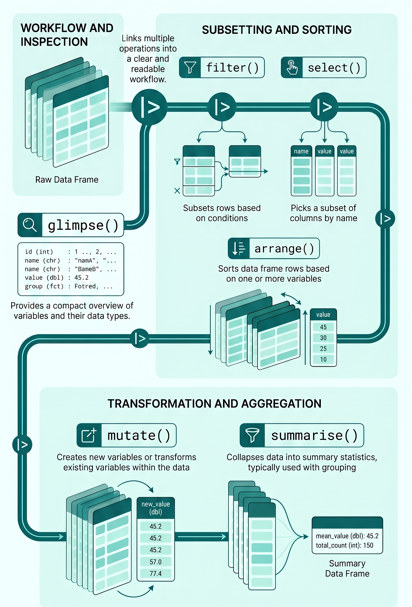
dplyrpackage provides a consistent “grammar” of data manipulation with set of verbs in R.
The key operator and core verbs include:
|>: the pipe operator used to link multiple operations into a clear and readable workflow (pipeline).
select(): selects a subset of columns from a data frame.
mutate(): creates new variables or transforms existing variables.
filter(): subsets rows based on logical conditions.
arrange(): sorts rows based on one or more variables.
summarise() / summarize(): collapses data into summary statistics, often used with
group_by().
The structure and content of a dataset can be quickly explored using the
glimpse()function from thedplyrpackage, which provides a compact overview of variables and their types.
The Pipe Operator |>
- Passes data left → right, step by step - no nesting, no temp objects
- Saving each step (cluttered)
- Nesting functions (hard to read)
Two pipe flavours
| Pipe | Package needed? | When to use |
|---|---|---|
|> |
None (R ≥ 4.1) | Default - use this |
%>% |
dplyr / magrittr
|
When you need the . placeholder |
Tip
This works cleanly with %>%:
malaria %>% lm(hemoglobin ~ age + sex, data = .)This breaks with |> but limited supprot in
data = _for >4.2.
select(): To extract variables
Selecting variables is usually one of the first steps in data cleaning and data preparation.
It helps to simplify large datasets by keeping only the variables needed for analysis.
select()is our first verb, useful when preparing reporting datasets, indicator tables, or survey analysis datasets.It improves workflow efficiency by reducing unnecessary columns before further transformation or analysis.
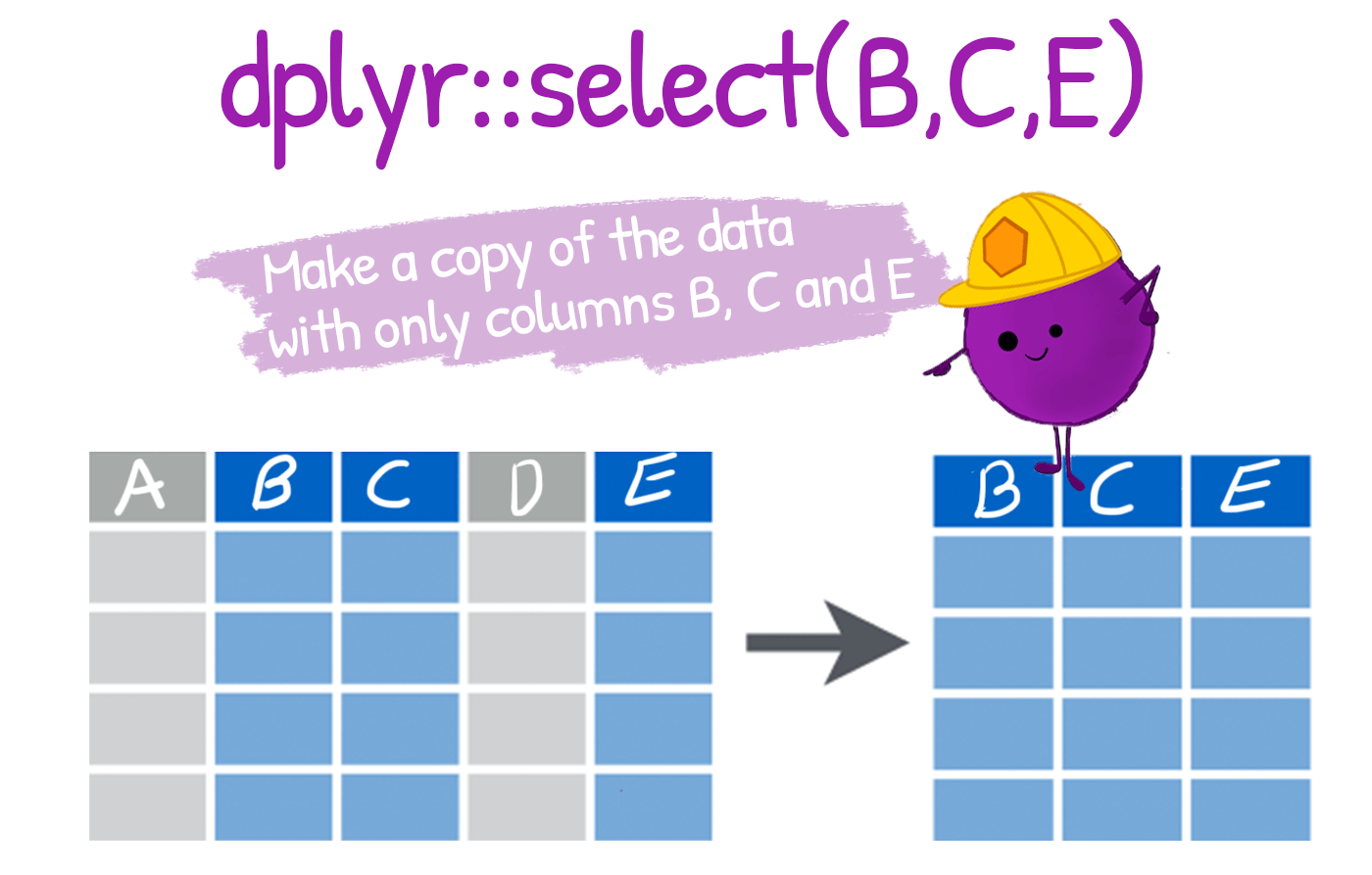
- It supports flexible selection using variable names, ranges, or helper functions (e.g.,
starts_with(),contains()).
-
dplyr::select()lets us pick which columns (variables) to keep or drop. In survey work this is the first cleaning step: from dozens of collected fields, keep only the ones an analysis needs.
To select multiple variables, we separate them with commas:
# A tibble: 6 × 3
    age sex    rdt_result
  <dbl> <chr>  <chr>
1    27 Male   Not tested
2    25 Female Not tested
3    16 Male   Not tested
4     9 Male   Not tested
5    49 Female Not tested
6     9 Female Not tested
Select the 13th and 19th columns in the
malariadata frame.For the next part of the tutorial, let’s create a smaller subset of the data, called
mis.
Selecting column ranges with :
The : operator selects a range of consecutive variables:
Excluding columns with !
The exclamation point negates a selection:
# A tibble: 3 × 9
  sex    education_level pregnancy_status fever_last_2weeks bednet_used
  <chr>  <chr>           <chr>            <chr>             <chr>
1 Male   Primary         Not applicable   No                Yes
2 Female Secondary       Not pregnant     No                No
3 Male   Higher          Not applicable   No                No
# ℹ 4 more variables: rdt_result <chr>, malaria_positive <chr>,
#   hemoglobin <dbl>, region <chr>
To drop consecutive columns:!age:pregnancy_status:
To drop several non-consecutive columns, place them inside !c():
Helper functions for select()
dplyrhas a number of helper functions to make selecting easier by using patterns from the column names. Let’s take a look at some of these.starts_with()andends_with(): these two helpers work exactly as their names suggest!
contains()
-
contains()helps select columns that contain a certain string:
everything()
- Another helper function,
everything(), useful for establishing the order of columns.- eg, to bring the
rdt_resultcolumn to the start of themisdata frame, we could type out all the column names manually or usingeverything()function:
- eg, to bring the
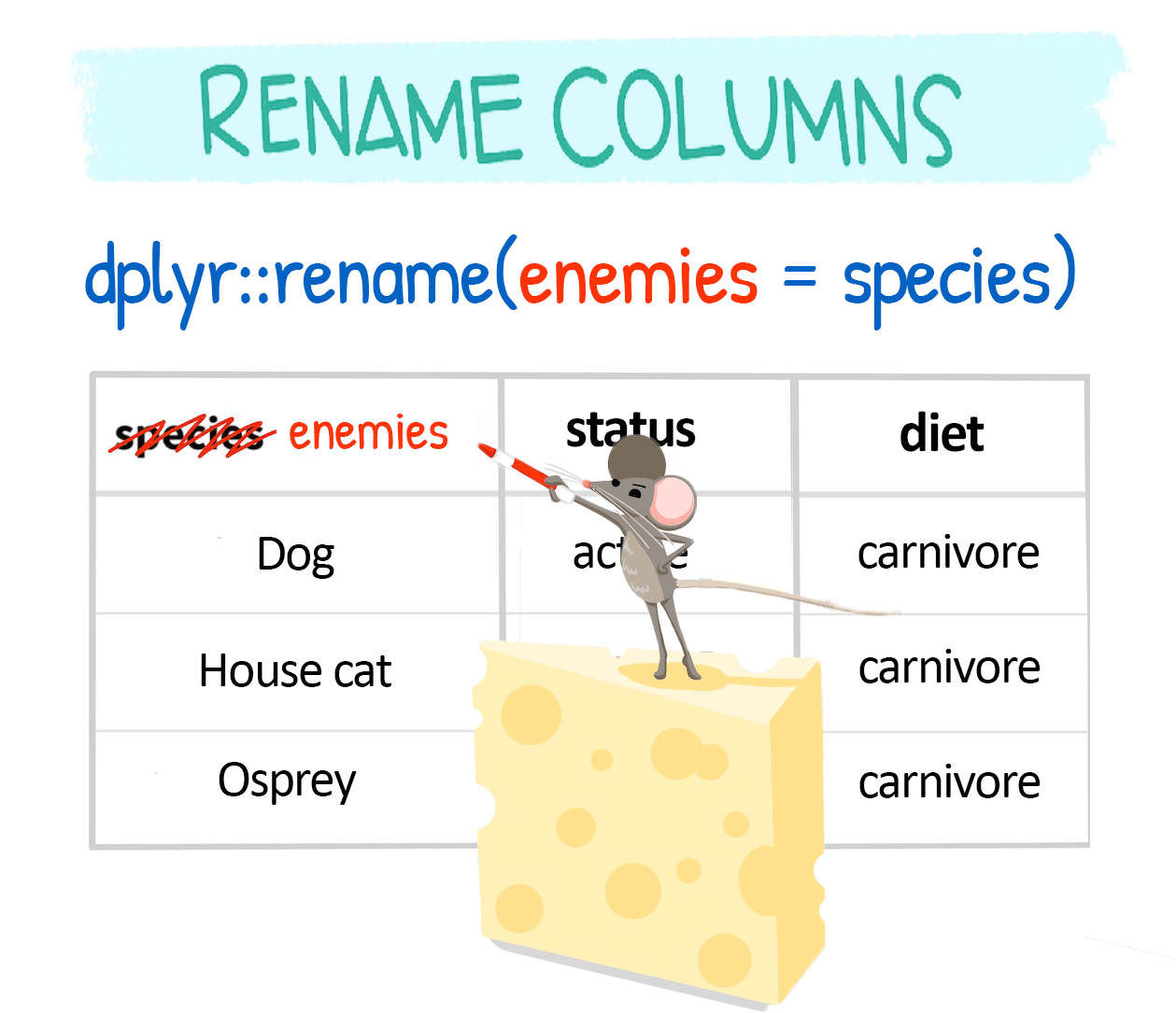
Change column names with rename()
dplyr::rename() is used to change column names:
-
rename()changes chosen columns (new = old):
Rename within select()
You can also rename columns while selecting them:
Advance select() functions
You can also select columns based on their data type using
where()usingselect(where(is.numeric)).The common type tests are:
is.character,is.double,is.factor,is.integer,is.logical,is.numeric.rename_with()applies a function to many names at once,rename_with(toupper)
-
Also the following are other important function
-
_all()if you want to apply the function to all columns -
_at()if you want to apply the function to specific columns (specify them withvars()) -
_if()if you want to apply the function to columns of a certain characteristic (e.g. data type) -
_with()if you want to apply the function to columns and include another function within it
-
Note
These variants are quite flexible, and keep changing for individual functions (eg,. rename_with(), rename_all(), rename_at(), rename_if()).
filter()
- Dropping abnormal data entries or keeping subsets of your data points is another essential aspect of data wrangling.
filter(dataframe, logical statement 1, logical statement 2, ...)- We use
filter()to keep rows that satisfy a set of conditions. - If we want to keep just the male records, we run:
- Note the use of the double equal sign
==rather than the single equal sign=.
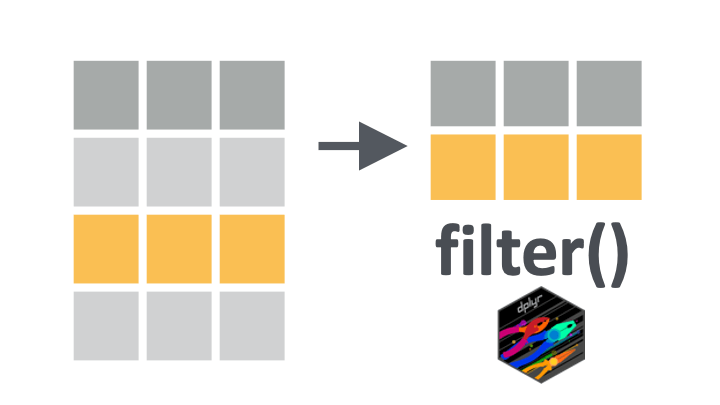
- So the code
mis |> filter(sex == "Male")will keep all rows.
Relational operators
- The
==operator introduced above is an example of a “relational” operator, as it tests the relation between two values. Here is a list of some of these operators:
| Operator | is TRUE if |
| A < B | A is less than B |
| A <= B | A is less than or equal to B |
| A > B | A is greater than B |
| A >= B | A is greater than or equal to B |
| A == B | A is equal to B |
| A != B | A is not equal to B |
| A %in% B | A is an element of B |
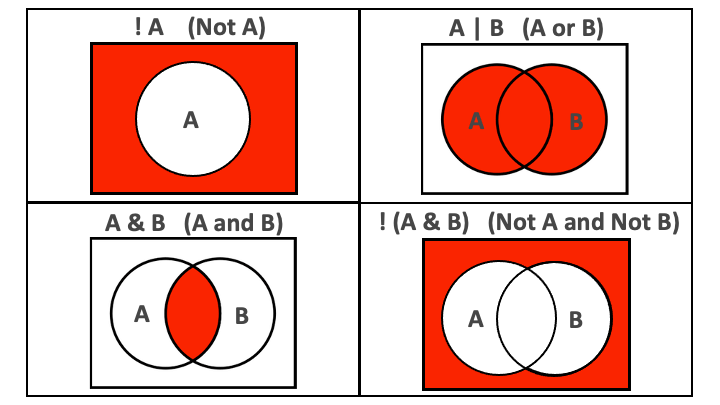
Let’s see how to use these within filter():
Code
mis |> filter(sex != "Male") ## keep rows where `sex` is not "Male"
mis |> filter(age < 5) ## keep children under 5 (a key malaria risk group)
mis |> filter(age >= 65) ## keep respondents aged at least 65

### keep respondents whose education is "Primary" or "Secondary"
mis |> filter(education_level %in% c("Primary", "Secondary"))
Combining conditions with & and |
We can pass multiple conditions to a single filter() statement separated by commas:
- keep women who are pregnant and did not sleep under a bednet
When multiple conditions are separated by a comma, they are implicitly combined with an and (
&).It is best to replace the comma with
&to make this more explicit.
Side Note
Don’t confuse:
the “,” in listing several conditions in filter
filter(A,B)i.e. filter based on condition A and (&) condition Bthe “,” in lists
c(A,B)which is listing different components of the list (and has nothing to do with the&operator)
- If we want to combine conditions with an or, we use the vertical bar symbol,
|.
Negating conditions with !
To negate conditions, we wrap them in
!().Below, we drop respondents who are children (less than 5 years) or who are anemic (hemoglobin below 11 g/dL):
- The
!operator is also used to negate%in%since R does not have an operator for NOT in.
Key Point
It is easier to read
filter()statements as keep statements, to avoid confusion over whether we are filtering in or filtering out!So the code below would read: “keep respondents who are under 5 or who are anemic (hemoglobin under 11)”.
- And when we wrap conditions in
!(), we can then readfilter()statements as drop statements.
So the code below would read: “drop respondents who are under 5 or who are anemic (hemoglobin under 11)”.
Filtering on a numeric range with between()
- For a numeric range you could write two conditions, but
between()is shorter and clearer. Here we keep individuals whose hemoglobin sits in the mild-anemia band (11 to 13 g/dL):
Code
# A tibble: 6 × 3
  individual_id sex    hemoglobin
  <chr>         <chr>       <dbl>
1 HH-00001-02   Female       11.5
2 HH-00001-03   Male         11.4
3 HH-00001-04   Male         11.1
4 HH-00001-05   Female       12.4
5 HH-00001-06   Female       12.6
6 HH-00002-01   Male         11.2
Key Point
filter(between(hemoglobin, 11, 13)) is equivalent to filter(hemoglobin >= 11, hemoglobin <= 13).
Filtering across multiple columns with if_any() / if_all()
- To apply one condition to several columns at once, use
if_any()(any column meets it, like OR) orif_all()(every column meets it, like AND). These replace the olderfilter_all(),filter_at(), andfilter_if()helpers.
Tip
if_any()/if_all() accept the same column selectors as select() (names, starts_with(), where(is.numeric)), so one pattern covers many filtering needs.
Filltering Missing values
- The relational operators introduced so far do not work with
NA.
The special function is.na() is therefore necessary:
This function can be negated with !:
Creating new variables with mutate()
mutate()adds new columns while keeping the existing ones.-
In survey work this is how we build indicators: turning raw fields into the variables an analysis actually needs.
-
mutate()adds new variables, keeping the old ones. -
across()applies the same transformation to several columns at once (the modern replacement formutate_all(),mutate_at(), andmutate_if()).
-
Transform many columns at once with across()
-
across()insidemutate()applies one function to several columns in a single step. - It is the recommended replacement for the older
mutate_all(),mutate_at(), andmutate_if()helpers.
Code
# A tibble: 6 × 28
  individual_id household_id region zone   woreda    kebele       household_size
  <chr>         <chr>        <chr>  <chr>  <chr>     <chr>                 <dbl>
1 HH-00001-01   HH-00001     Amhara AMH-Z5 AMH-Z5-W2 AMH-Z5-W2-K…              8
2 HH-00001-02   HH-00001     Amhara AMH-Z5 AMH-Z5-W2 AMH-Z5-W2-K…              8
3 HH-00001-03   HH-00001     Amhara AMH-Z5 AMH-Z5-W2 AMH-Z5-W2-K…              8
4 HH-00001-04   HH-00001     Amhara AMH-Z5 AMH-Z5-W2 AMH-Z5-W2-K…              8
5 HH-00001-05   HH-00001     Amhara AMH-Z5 AMH-Z5-W2 AMH-Z5-W2-K…              8
6 HH-00001-06   HH-00001     Amhara AMH-Z5 AMH-Z5-W2 AMH-Z5-W2-K…              8
# ℹ 21 more variables: wealth_quintile <chr>, distance_health_facility <dbl>,
#   altitude <dbl>, rainfall_mm <dbl>, irs_received <chr>, age <dbl>,
#   sex <chr>, pregnancy_status <chr>, education_level <chr>,
#   fever_last_2weeks <chr>, malaria_tested <chr>, rdt_result <chr>,
#   malaria_positive <chr>, treatment_received <chr>, bednet_owned <chr>,
#   bednet_used <chr>, bednet_condition <chr>, hemoglobin <dbl>,
#   anemia_status <chr>, bmi <dbl>, nutritional_status <chr>
Code
# A tibble: 26,264 × 28
   individual_id household_id region         zone   woreda kebele household_size
   <chr>         <chr>        <chr>          <chr>  <chr>  <chr>           <dbl>
 1 HH-00001-01   HH-00001     Amhara         AMH-Z5 AMH-Z… AMH-Z…              8
 2 HH-00001-02   HH-00001     Amhara         AMH-Z5 AMH-Z… AMH-Z…              8
 3 HH-00001-03   HH-00001     Amhara         AMH-Z5 AMH-Z… AMH-Z…              8
 4 HH-00001-04   HH-00001     Amhara         AMH-Z5 AMH-Z… AMH-Z…              8
 5 HH-00001-05   HH-00001     Amhara         AMH-Z5 AMH-Z… AMH-Z…              8
 6 HH-00001-06   HH-00001     Amhara         AMH-Z5 AMH-Z… AMH-Z…              8
 7 HH-00001-07   HH-00001     Amhara         AMH-Z5 AMH-Z… AMH-Z…              8
 8 HH-00001-08   HH-00001     Amhara         AMH-Z5 AMH-Z… AMH-Z…              8
 9 HH-00002-01   HH-00002     South Ethiopia SOU-Z5 SOU-Z… SOU-Z…              7
10 HH-00002-02   HH-00002     South Ethiopia SOU-Z5 SOU-Z… SOU-Z…              7
# ℹ 26,254 more rows
# ℹ 21 more variables: wealth_quintile <chr>, distance_health_facility <dbl>,
#   altitude <dbl>, rainfall_mm <dbl>, irs_received <chr>, age <dbl>,
#   sex <chr>, pregnancy_status <chr>, education_level <chr>,
#   fever_last_2weeks <chr>, malaria_tested <chr>, rdt_result <chr>,
#   malaria_positive <chr>, treatment_received <chr>, bednet_owned <chr>,
#   bednet_used <chr>, bednet_condition <chr>, hemoglobin <dbl>, …
Tip
across(c(...)) selects columns by name; across(where(is.numeric)) selects by type. The same idea works inside summarise().
Sort rows with arrange()
arrange()re-orders rows, ascending by default. Wrap a variable indesc()for descending order:arrange(data, var1, desc(var2), ...).Here we sort individuals by region, then from the most anemic downward, to surface the people who may need follow-up first:
Code
# A tibble: 6 × 3
  individual_id region hemoglobin
  <chr>         <chr>       <dbl>
1 HH-00657-06   Afar         18
2 HH-02676-01   Afar         18
3 HH-02840-03   Afar         17.7
4 HH-04089-03   Afar         17.4
5 HH-04430-05   Afar         17.4
6 HH-00534-02   Afar         17.3
Tip
Try arrange(hemoglobin) (ascending) versus arrange(desc(hemoglobin)) and watch which rows rise to the top.
group_by() and summarise()
- The
dplyrverbs become especially powerful when they are are combined using the pipe operator|>.
- The following
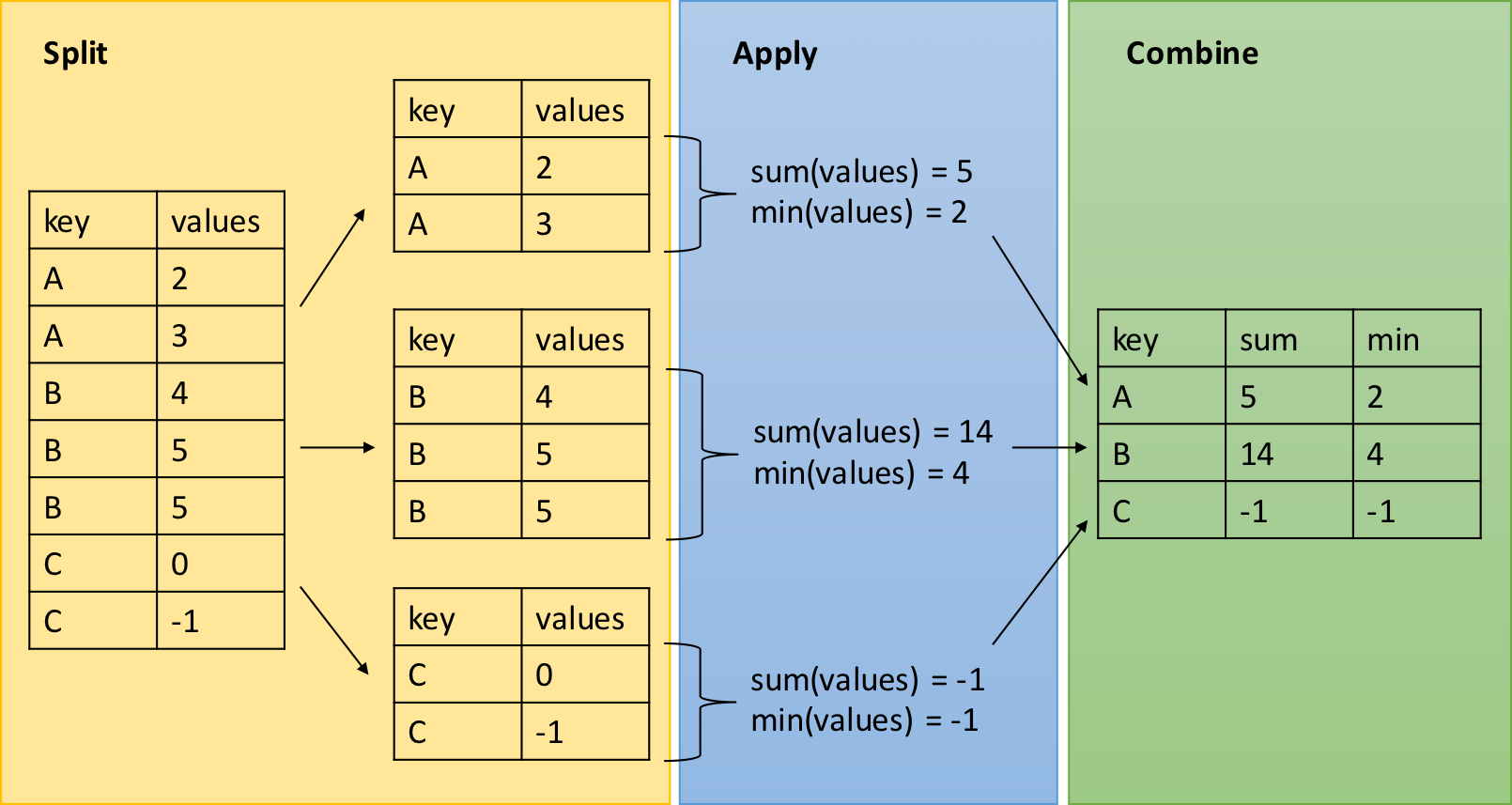
dplyrfunctions allow us to split our data frame into groups on which we can perform operations individually -
group_by(): group data frame by a factor for downstream operations (usually summarise) -
summarise(): summarise values in a data frame or in groups within the data frame with aggregation functions (e.g.min(),max(),mean(), etc…)
dplyr - Split-Apply-Combine
The group_by function is key to the Split-Apply-Combine strategy
Test positivity by region (the key MIS indicator)
- The most important malaria survey number is the test positivity rate: of the people who were tested, what share were positive.
group_by()plussummarise()gives it to us for every region in one step.
Code
# A tibble: 8 × 4
  region            n_tested n_positive positivity_pct
  <chr>                <int>      <int>          <dbl>
1 Gambella               686        358           52.2
2 Benishangul Gumuz      655        233           35.6
3 Afar                   829        181           21.8
4 Somali                 606        112           18.5
5 South Ethiopia         411         13            3.2
6 Oromia                 842         24            2.9
7 Sidama                 230          4            1.7
8 Amhara                 655          9            1.4
How to read this
Lowland regions (Gambella, Benishangul Gumuz) sit far above the highlands (Amhara, Sidama). This pattern, not a single national average, is what guides where to send nets and spraying.
The same numbers, as a picture
A summary table becomes far more persuasive as a chart. The positivity gradient across regions is obvious at a glance:
Code
library(ggplot2)
positivity |>
  ggplot(aes(x = reorder(region, positivity_pct),
             y = positivity_pct)) +
  geom_col(fill = "#047B77") +
  geom_text(aes(label = paste0(positivity_pct, "%")),
            hjust = -0.15, size = 3.5) +
  coord_flip() +
  labs(x = NULL, y = "Test positivity (%)",
       title = "Malaria test positivity by region") +
  theme_minimal(base_size = 13)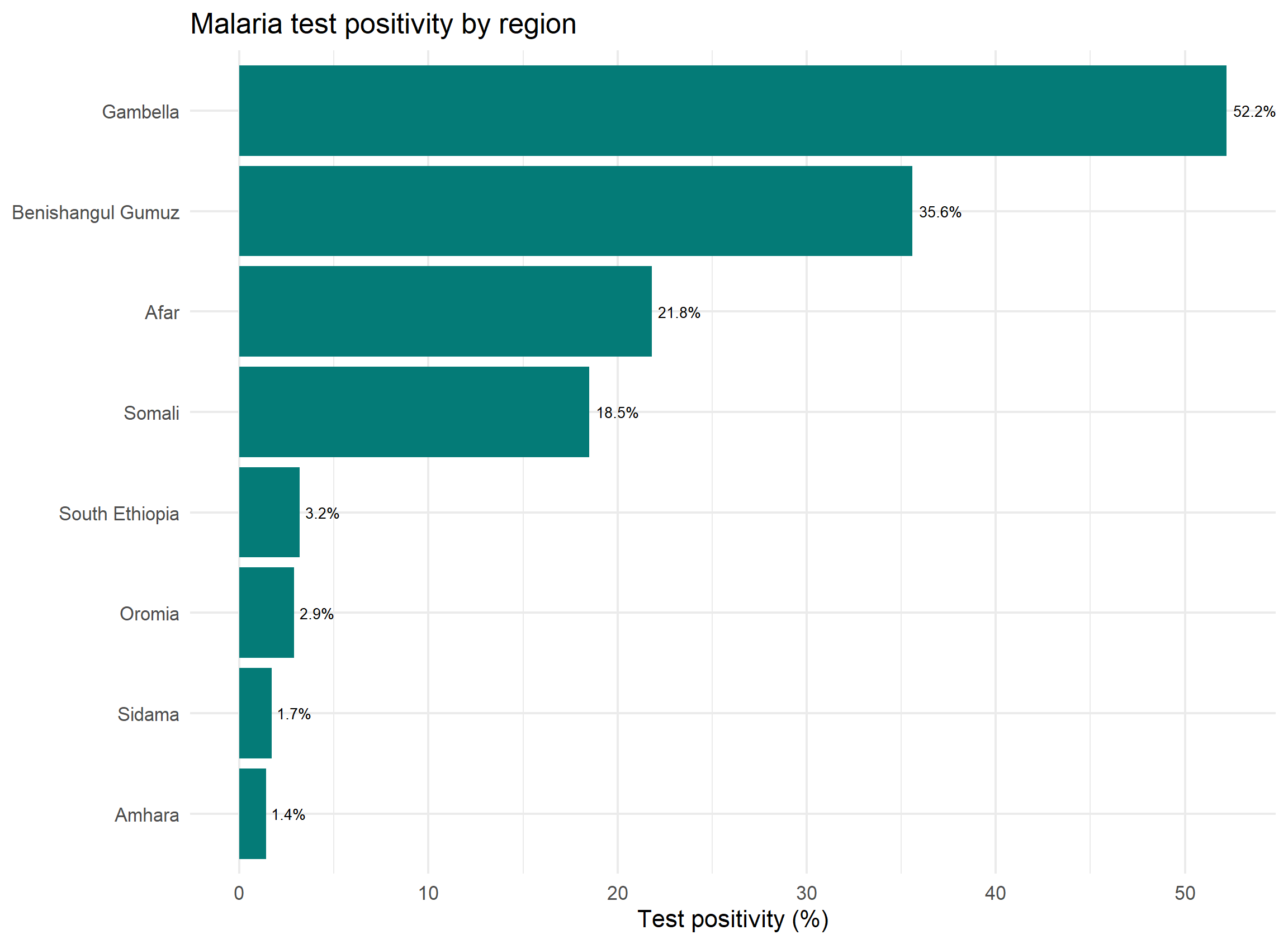
Summarising many columns with across()
- To compute the same statistic over several columns, use
across()insidesummarise(). - This is the modern replacement for
summarize_all(),summarize_at(), andsummarize_if().
Code
# A tibble: 8 × 4
  region            hemoglobin distance_health_facility altitude
  <chr>                  <dbl>                    <dbl>    <dbl>
1 Afar                    12.8                      7.7     552.
2 Amhara                  12.9                      7.8    2295.
3 Benishangul Gumuz       12.7                      8.1     882.
4 Gambella                12.5                      7.1     508.
5 Oromia                  12.9                      7.7    2011.
6 Sidama                  12.9                      8      2132.
7 Somali                  12.8                      7.7     656.
8 South Ethiopia 12.9 8 1696.- Select columns by name (
c(...)), by type (where(is.numeric)), or by pattern (starts_with("bednet")), exactly as inselect().
Recoding messy field entries
- A common headache: enumerators record the same answer many ways.
- Here, an RDT result column collected by different field teams:
Code
library(dplyr)
raw_malaria <- tibble(
  individual_id = sprintf("P-%02d", 1:12),
  region = c("Amhara","amhara","Oromia","oromia","Somali","somali",
             "Gambella","gambella","Afar","afar","Sidama","sidama"),
  result = c("Pos","positive","P","Neg","negative","N",
             "POS","Positive","Negative","neg","pos","NEG"))
#write.csv(raw_malaria, "raw_malaria.csv")- Twelve rows, but the result is written eight different ways.
- We need to standardize before any analysis.
recode(): map old values to new
-
recode()insidemutate()rewrites specific values. - List each old value and what it should become:
Code
# A tibble: 2 × 2
  result       n
  <chr>    <int>
1 Negative     6
2 Positive     6
Warning
recode() is fine for a short, fixed list, but it gets unwieldy fast. For anything with rules or ranges, reach for case_when().
case_when(): rule-based recoding
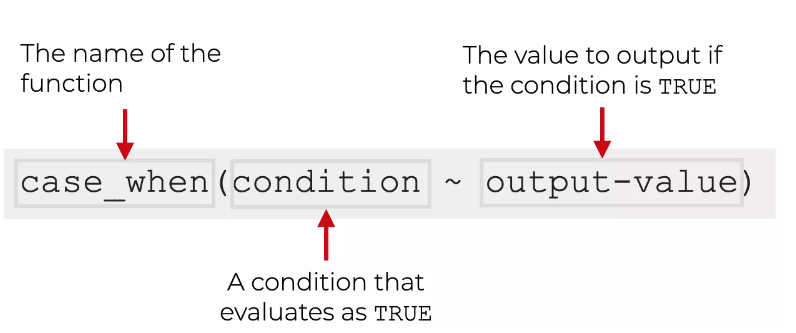
-
case_when()checks conditions top to bottom. Any value not matched becomesNAunless you add a finalTRUE ~ ...catch-all.
Code
# A tibble: 2 × 2
  result_clean     n
  <chr>        <int>
1 Negative         6
2 Positive         6
Two-level indicators with if_else()
- To turn a numeric variable into a yes/no category,
if_else()is the cleanest tool. - Here we flag anemia from hemoglobin:
Use of naniar and janitor packages for data cleaning
naniar
used to work with missing data
Sometimes you need to look at lots of data though… the
naniarpackage is a good option.The
pct_complete()function shows the percentage that is complete for a given data object, (vector or data frame).
Code
[1] 95.18638
naniar plots
- The
gg_miss_var()function creates a nice plot about the number of missing values for each variable, (need a data frame).
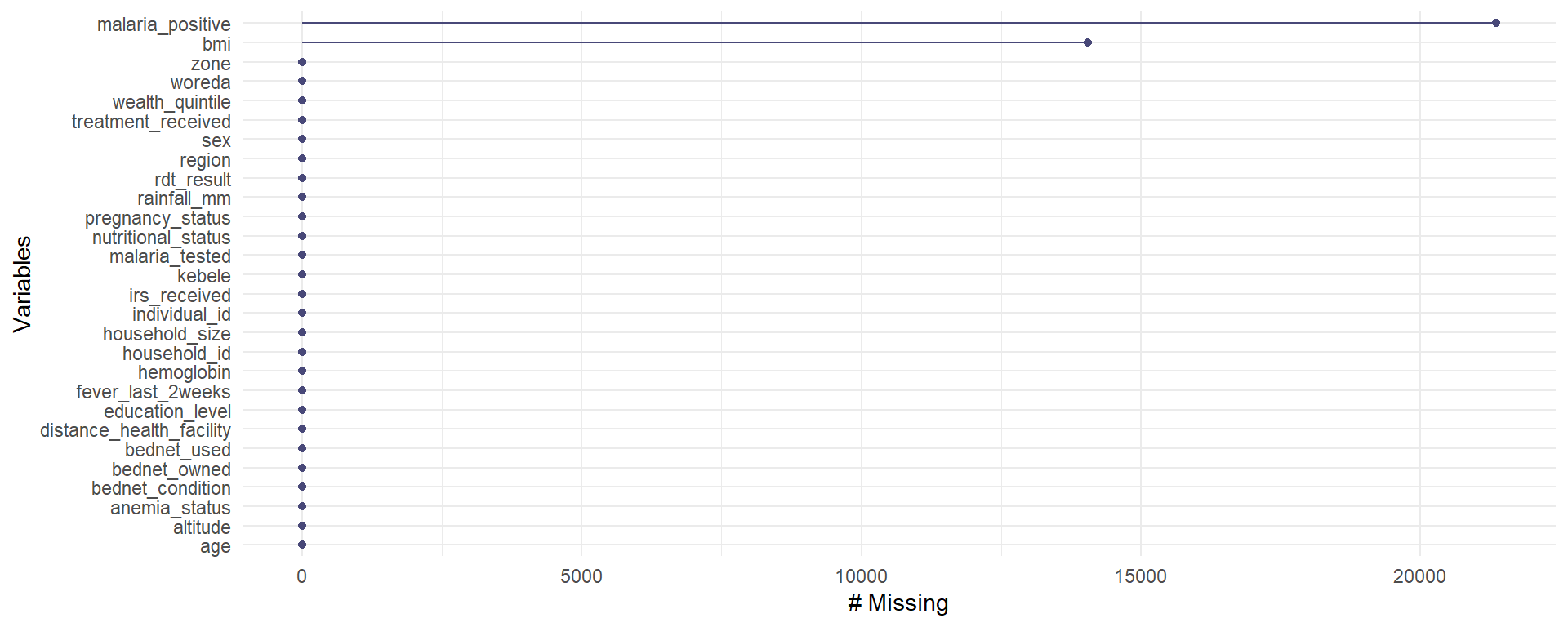
To remove rows with NA values for a variable use drop_na()
A function from the
tidyrpackage. (Need a data frame to start!)Don’t do this unless you have thought about if dropping
NAvalues makes sense based on knowing what these values mean in your data.
Change a value to be NA
- The
na_if()function ofdplyris useful when a sentinel value was used for “not recorded”. Here a0innets_ownedreally meant missing, so we convert it toNA.
janitor
Used for data cleaning, which is one of the most essential parts of analysis: turning messy field data into something reliable you can analyze in R.
-
Common tasks:
- fix ugly column names,
- drop blank rows or columns,
- remove duplicate rows, and
- check consistency with frequency tables.
The janitor package handles all of these.
Some functions of janitor
-
clean_names(): standardizes column names:
lower case, separated by underscores, no spaces or special characters. This is almost always the first step after importing a survey export.
Here is a small, messy survey extract: ugly column names, an empty column, a constant column, and a duplicated row.
Code
library(janitor)
dirty <- tibble(
  `Household ID`     = c("HH-01","HH-02","HH-02","HH-03"),
  `Region `          = c("Amhara","Oromia","Oromia","Somali"),
  `RDT Result (+/-)` = c("Positive","Negative","Negative","Positive"),
  notes              = NA,        # completely empty column
  survey_year        = 2024)      # constant column
clean <- clean_names(dirty)       # tidy the column names
clean
# A tibble: 4 × 5
household_id region rdt_result notes survey_year
<chr> <chr> <chr> <lgl> <dbl>
1 HH-01 Amhara Positive NA 2024
2 HH-02 Oromia Negative NA 2024
3 HH-02 Oromia Negative NA 2024
4 HH-03 Somali Positive NA 2024-
remove_empty()&remove_constant()
-
remove_empty()drops fully blank rows or columns;remove_constant()drops columns that never vary. - Together they strip out the
notesandsurvey_yearjunk:
-
get_dupes(): examine duplicate rows
-
get_dupes()returns the duplicated rows with adupe_countcolumn, so you can decide whether a repeat is a true duplicate or two real people. HH-02 appears twice:
# A tibble: 2 × 6
  household_id dupe_count region rdt_result notes survey_year
  <chr>             <int> <chr>  <chr>      <lgl>       <dbl>
1 HH-02                 2 Oromia Negative   NA           2024
2 HH-02 2 Oromia Negative NA 2024-
distinct()fromdplyrthen keeps one copy of each unique row:
Excercises
Keep only
individual_id,region,age, andrdt_result.Select all the bednet variables using a helper.
Keep every column except
zone,woreda, andkebele.Select only the numeric columns.
Keep children under 5 years old.
Keep individuals who were tested and had a positive RDT.
Keep people in Gambella or Benishangul Gumuz whose hemoglobin is below 11.
Keep rows where the person was not tested.
How many pregnant women did not sleep under a bednet? (combine
filter()withnrow()).Create
far_from_clinic="Yes"whendistance_health_facility > 10, else"No"(useif_else()).Create an
age_groupcolumn withcase_when()andrecode():"Under 5","5-14","15-49","50+".For each region, compute the number tested and the test positivity rate (% positive among tested). Sort from highest positivity.
Compare positivity for net users vs non-users (group by
bednet_used, among the tested).